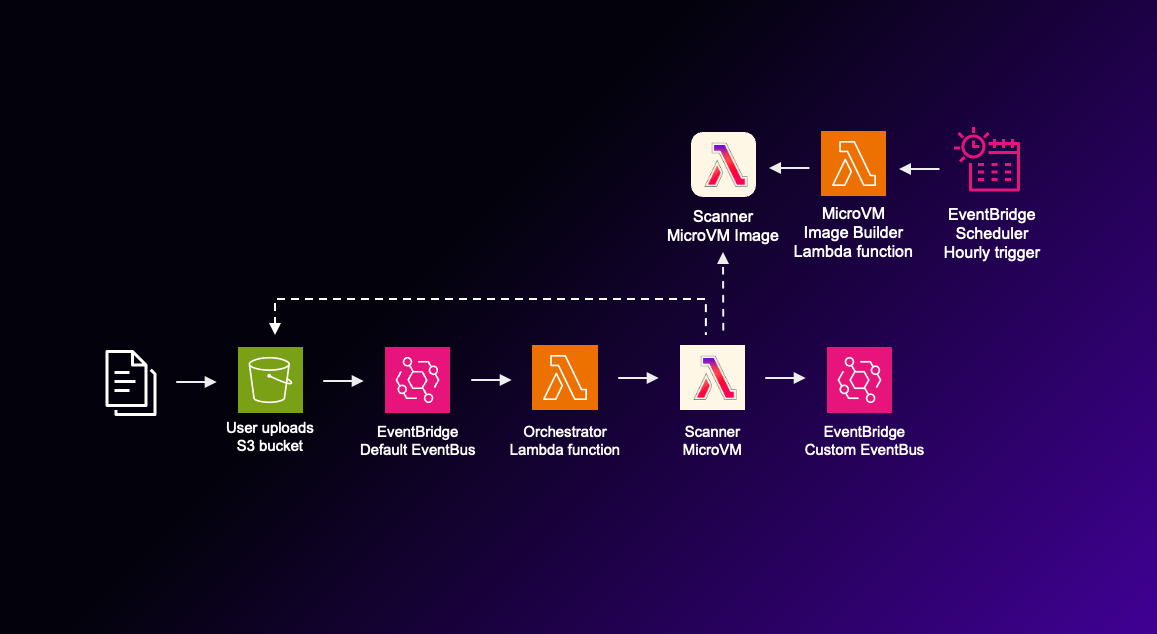
Scan user uploaded files using AWS Lambda MicroVM and ClamAV

Table of Contents
Every application that accepts user uploads needs to answer one common question: is the uploaded file safe to process? In order to verify that, you may use an antivirus engine to scan the uploaded file. One of such well known, free and open source antivirus engines is ClamAV.
Running ClamAV in a serverless setup can be difficult because the virus signature database is over 200 MB and it is being updated regularly. So, keeping the virus signature database up to date for each scan while reducing latency can be challenging.
Also, file scanning should happen in an isolated environment, ideally a single disposable environment per scan. This way, once the file scan is done, those resources can be thrown away safely without impacting the rest of the system.
AWS Lambda MicroVMs, address both these problems nicely. In this blog post, I discuss why a MicroVM is a good fit for this kind of jobs, walk through a workflow I built that scans user uploaded S3 files with ClamAV running inside a MicroVM, and show how to keep the virus signature database up to date.
Why MicroVM is the right fit #
Before MicroVMs, there were two most suitable ways to run ClamAV on AWS. You could squeeze it into a Lambda function, and accept the cold start penalty of fetching and loading the database, the packaging effort, and the 15 minute execution cap. Or you could run clamd as an service on ECS or EC2, and accept paying including the idle time, one shared daemon scanning everyone’s files, and another piece of infrastructure you need to manage yourself.
A MicroVM takes the good parts of both the approaches:
-
A disposable VM per file. Malware scanning means feeding untrusted input to a software component, so you have to assume the scanner itself can be compromised by a crafted file. Regular Lambda also runs on Firecracker, but execution environments are reused across invocations: a file that exploits the scanner could persist in the warm environment and quietly tamper with the scans that follow it. For example, it can report the infected files as clean. With MicroVM approach, every file gets a fresh VM behind a hardware virtualization boundary, with an execution role that can only read the upload bucket and emit result events, and the VM is terminated right after the scan. The blast radius of the worst case is limited to a single disposable VM that has already done its job.
-
The snapshot removes the latency problem. When the MicroVM image is built, the platform runs the container, waits until the application reports ready, and snapshots its memory and disk. Here, I run
freshclamduring the image build, so the virus signature database files are baked into the snapshot’s disk and nothing is downloaded when a scan runs, and the VM boots with the database already in place. Each scan still spawnsclamscan, which loads the database from the snapshot’s disk into memory before scanning. But that time duration is trivial comparing to the latency of downloading virus signature database each time per scan. -
Packaging simplicity. A MicroVM image is defined by a very simple plain Dockerfile, and here I use the official
clamav/clamavas the base image. There is no runtime interface clients or Lambda layers. The only addition is a small Flask application that runs the scans. -
Serverless benefits. A VM is launched per upload and it start fast. Also it terminates itself when the scan is done. So you pay only while it runs. And with the options to configure vCPUs, memory and the running time up to 8 hours, it provides both power and simplicity of serverless.
Architecture #
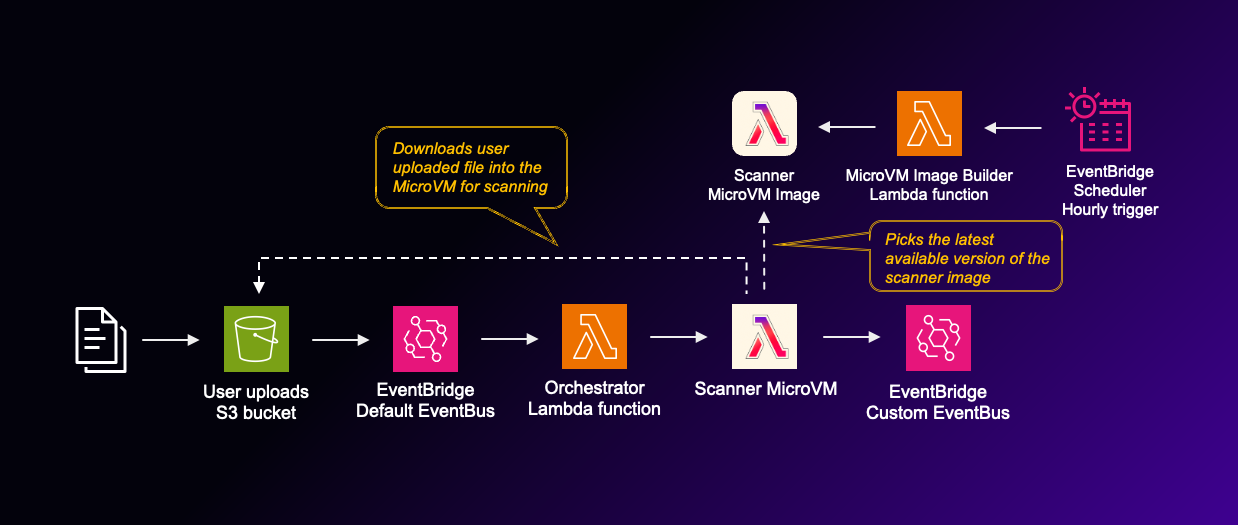
This is the high level architecture of the virus scanning flow. There are two main parts of the system: file scanning flow and the functionality to keep the virus signature database up to date.
File scanning flow #
- A user uploads a file to the upload bucket, which has EventBridge notifications enabled.
- An
Object Createdrule on the default event bus triggers a small orchestrator Lambda function. This extra step exists because as at now, a MicroVM cannot be an EventBridge rule target directly. Something has to call theRunMicrovmAPI, and here a Lambda function is the middleman facilitates that. - The orchestrator calls
RunMicrovm, passing the bucket and key as the run hook payload. As at now, default boto3 in the Lambda runtime doesn’t support MicroVM API. So you have to bundle boto3 version 1.43.0 or higher into this function. - The platform launches a MicroVM from the ClamAV image snapshot, the application downloads the object, runs
clamscan, and publishes aFileScannedevent with the resultCLEAN,INFECTEDorERRORto a custom event bus. - A rule on the custom bus writes the results to CloudWatch Logs. In a real application, you would route them to whatever handles quarantining or further processing of that file.
Inside the MicroVM #
I use the MicroVM non-interactive way to scan the files. Which means the application logic triggers using the lifecycle hooks. Here are the MicroVM hooks I utilised in this application:
-
The
/readyhook is called during the image build. It verifies if the virus signature database is already exists within the MicroVM. It returns 503 and fail if the ClamAV database files not exist, which guarantees the snapshot always contains the virus signature database. -
The
/validatehook runs after the snapshot is taken, on a test MicroVM. I scan the EICAR test string there, which validates if the image actually detects malware before it ever scans actual files. -
The
/runhook is where the actual scan of the file happens. The payload passed toRunMicrovmis delivered as the body of this hook. The application kicks off the scan on a background thread and returns immediately. The scan downloads the object from S3, runsclamscan, and publishes the results to EventBridge. This also includes the matched signature name, the database version and build time read straight from the snapshot. MicroVM execution role provides all the permissions required to talk to the services in use: S3, EventBridge and CloudWatch.
I have below idle policy for the MicroVM.
{
  "maxIdleDurationSeconds": 60,
  "suspendedDurationSeconds": 0,
  "autoResumeEnabled": false
}
Once the run hook is completed, MicroVM will be suspended after 60 seconds (This is the minimum time allowed). After that, will be terminated immediately.
Keeping the signatures database fresh #
Baking the database into the snapshot is what makes the scan fast, but it comes with an obvious downside. Virus signatures age with the image. An antivirus scanner running week-old signatures is not much of useful. One solution is to download the virus signature database at the file scan time, but it is not the best approach because it adds significant latency and, since each file scan use independent execution environments, there is no way to reuse the downloaded signature database.
The better solution is to rebuild the MicroVM image with the latest virus signature database. There is an EventBridge Scheduler invokes an image builder Lambda function every hour. Within that Lambda function it run UpdateMicrovmImage where it starts a new image build using the Dockerfile provided which includes freshclam. freshclam is the official cli tool and daemon used to download and update malware and virus signature databases for the ClamAV antivirus engine. So an hourly Lambda function that updates the scanner image produces a new active version of the image with the latest virus signatures. The next file scan after a rebuild is scanned within a MicroVM that use the latest image so that the latest database will be used.
Rebuilding image with
update_microvm_imageis quite easy, because we can reuse the configurations from existing image including the S3 code artifacts. And Lambda service will simply take care of the build process and we don’t need to handle it.
Rebuilding only when virus database has new updates #
A full image build and snapshot is expensive, and ClamAV does not publish new signatures every hour. So before rebuilding the MicroVM image, the function checks whether it needs to.
ClamAV publishes its current signature record as a DNS TXT record at current.cvd.clamav.net, which is the same source freshclam itself uses. The record is a colon-separated string like 1.4.5:63:28072:1785016800:1:90:49192:339, and field index 3 is the UNIX timestamp at which the latest virus database was published.
If that timestamp falls inside the last hour, the function starts building the new image. Otherwise it ignores the update. However, if the DNS lookup fails for any reason, function will anyway build the image as a fall back.
Removing old image versions #
Every rebuild creates an image version, and every version holds a snapshot you pay storage for whether or not anything is running on it. As at now, Lambda does not provide any functionality to automatically expire the old images. So, we have to manage it ourselves.
What I did here was fetching all the image versions available and order them by the created at value and delete one by one using API DeleteMicrovmImageVersion except two most recent image versions.
Please note: When there is a image build in progress, the
DeleteMicrovmImageVersionAPI will be rejected for every version of that image, not just the one being built. It is an image level lock.
Because of this reason, I run the deletion of old versions before start building the new version.
Try this yourself #
The full code is available at github.com/pubudusj/microvm-file-scan.
- Clone the repository and install the dependencies:
git clone https://github.com/pubudusj/microvm-file-scan
cd microvm-file-scan
python3 -m venv .venv && source .venv/bin/activate
pip install -r requirements.txt
- Deploy both stacks:
cdk deploy --all
The first deploy takes a few minutes because CloudFormation builds and snapshots the MicroVM image.
Please note: As at now, Lambda MicroVMs is available in a limited set of regions. Make sure you deploy the stacks to one of them.
Testing #
Once the project is deployed into your AWS account, there will be several outputs. To test the functionality, first upload a file to the bucket name shown in the stack outputs:
echo "hello" > hello.txt
aws s3 cp hello.txt s3://<UploadBucketName>/
Shortly after, a FileScanned event with status: CLEAN appears in the results log group created by the stack. Sample event looks like below:
{
    "version": "0",
    "id": "994e766e-cf1b-cba6-2bae-21f9c658620b",
    "detail-type": "FileScanned",
    "source": "file.scanner",
    "account": "xxxxxxxxxx",
    "time": "2026-07-29T12:59:33Z",
    "region": "eu-west-1",
    "resources": [],
    "detail": {
        "bucket": "microvmfilescanstack-uploadbucketxxxxxxxx-xxxxxxxxxxxx",
        "key": "hello.txt",
        "status": "CLEAN",
        "signature": null,
        "dbVersion": "28076",
        "dbTimestamp": "29 Jul 2026 06:25 +0000",
        "scannedAt": "2026-07-29T12:59:33.861586+00:00"
    }
}
To see a detection, upload the harmless, industry standard EICAR test file:
printf 'X5O!P%%@AP[4\\PZX54(P^)7CC)7}$EICAR-STANDARD-ANTIVIRUS-TEST-FILE!$H+H*' > eicar.com
aws s3 cp eicar.com s3://<UploadBucketName>/
The resulting event looks like this:
{
    "version": "0",
    "id": "b0c38807-a8e7-90e3-031c-20c97ff5e0f5",
    "detail-type": "FileScanned",
    "source": "file.scanner",
    "account": "xxxxxxxxxx",
    "time": "2026-07-29T13:01:40Z",
    "region": "eu-west-1",
    "resources": [],
    "detail": {
        "bucket": "microvmfilescanstack-uploadbucketxxxxxxxx-xxxxxxxxxxxx",
        "key": "eicar.com",
        "status": "INFECTED",
        "signature": "Eicar-Test-Signature",
        "dbVersion": "28076",
        "dbTimestamp": "29 Jul 2026 06:25 +0000",
        "scannedAt": "2026-07-29T13:01:40.882464+00:00"
    }
}
Notice the signature, dbVersion and dbTimestamp fields. Every result records exactly which signature set produced it, and dbTimestamp and dbVersion are a result of the hourly build process.
Please note: When you create the eicar.com test file in your computer, your anti-virus program will most probably immediately detect and quarantine it (even it is not harmful). Instead of creating this locally, you can open up a cloudshell session in your AWS console and create and upload the test file from there.
Limitations #
-
The virus database refresh is only as fine grained as the schedule. The interval between attempts to rebuilding the image can be set as per your need, because actual image building will happen only when there is a virus update available.
-
This design launches one MicroVM per upload, which is great for isolation but adds a small launch overhead per file. For high volume workloads, you could reuse a VM for a batch of files but you will loose per-file isolation.
-
Be aware that some of the API operations have lower transactions per second ex: RunMicrovm, SuspendMicrovm, TerminateMicrovm. And these rate limits are per account, per region which means if you have other MicroVMs running for other purposes in the same region, you will likely to be throttled. Refer https://docs.aws.amazon.com/lambda/latest/dg/gettingstarted-limits.html#microvms-quotas for more information.
Summary #
For a requirement where you have to scan user uploaded files for malware, it is better to perform it in a disposable isolated environment. It is exactly the kind of job MicroVMs were built for with the vm-level isolation and serverless operational model.
In this project I use ClamAV an free and open source antivirus engines, but you can use any similar products suits your the best.
MicroVM is really fast to start, however, downloading virus signature database every time before a file scan will not be efficient. Baking the virus signature into the MicroVM image is the solution. However, it is necessary to have a workflow that keeps the MicroVM image up to date in regular intervals with the latest virus signature database.
Resources #
- Lambda MicroVMs developer guide: https://docs.aws.amazon.com/lambda/latest/dg/lambda-microvms-guide.html
- Lambda MicroVMs API reference: https://docs.aws.amazon.com/lambda/latest/microvm-api/Welcome.html
- AWS Lambda MicroVMs announcement blog: https://aws.amazon.com/blogs/aws/run-isolated-sandboxes-with-full-lifecycle-control-aws-lambda-introduces-microvms/
- ClamAV: https://www.clamav.net
- ClamAV private mirror / signature distribution notes: https://docs.clamav.net/manual/Usage/SignatureManagement.html
- EICAR test file: https://www.eicar.org
👋 I regularly create content on AWS and Serverless, and if you’re interested, feel free to follow / connect with me so you don’t miss out on my latest posts!
- LinkedIn: https://www.linkedin.com/in/pubudusj
- Twitter/X: https://x.com/pubudusj